


MCP: Connecting AI Agents to Your Business Systems

Author
Carlos Bourque
Published
March 25, 2026
Read time
8 min
Every major business system — ERP, payroll, HR, CRM — was designed to be queried through a UI or an API. That was a reasonable design decision for a world where humans were the only consumers of that data. You built a dashboard, you trained your team, you exported a report when the CFO asked a question. It worked.
Now AI agents are consumers too. They need to read your data, reason over it, and act on it — in real time, in natural language, as part of a conversation. The interface hasn't caught up. Most enterprise systems are still waiting behind a UI that an AI can't navigate, or behind an API that wasn't designed with AI in mind.
Model Context Protocol (MCP) is what closes that gap. It's an open standard that gives AI assistants a structured, consistent way to discover what a system can do and call it directly. We've built it in production. This post is about what that actually means — for the systems you run today and the AI clients that will need to talk to them tomorrow.
MCP in 60 seconds
MCP is a JSON-RPC protocol with a clean three-layer architecture: an MCP host (the AI application — ChatGPT, Claude, VS Code) runs an MCP client that connects to your MCP server, which exposes tools, resources, and prompts in a structured way. The host discovers what your system can do, then calls those capabilities on demand. That's it.
Two transport modes: stdio for local servers, Streamable HTTP for remote deployments. The spec is open, versioned (current revision: 2025‑11‑25), and now governed by the Linux Foundation’s Agentic AI Foundation. Version negotiation happens during initialisation — client and server agree on a common protocol revision before any tool call is made.
The Integration Tax Nobody Talks About
Before MCP, connecting AI models to business systems meant writing custom integrations — one per model, one per system. If you have four systems and you want to connect them to three AI clients (say, Claude, ChatGPT, and Microsoft Copilot), you're looking at twelve bespoke integrations. Each one needs its own prompt engineering, its own API wrapper, its own maintenance. Add a new system, add N more integrations. Add a new AI client, add M more.
The industry has started calling MCP "USB-C for AI" — the analogy comes from BCG — who coined the phrase, and it's accurate. Before USB-C, every device had its own port. Before MCP, every AI-system pair needed its own connector. MCP collapses the N×M problem into N+M: build one MCP server per system, and any compliant AI client can connect to it. That's not a marketing claim — it's an architectural property of the protocol.
What Changes When Your System Gets an MCP Interface
The easiest way to understand the value: through what becomes possible, not through how it works. When a system has an MCP server, an AI assistant can answer questions against live production data in a single natural-language exchange — no SQL, no BI exports, no switching tabs.
We built an MCP server for a multi-tenant payroll and HR platform. Here's what that looks like in practice:
Compliance checks in seconds.
"Which employees are missing a payroll this month?" The AI queries the live system, identifies the gaps, and returns a structured answer. What used to require knowing where to look and how to filter now happens in one question.
Trend analysis without a report.
"How has our total employer cost evolved over the last 6 months?" The AI pulls the data across the period and surfaces the trend. No export, no pivot table, no waiting for the analyst.
Document retrieval on demand.
"Pull me the January payslip for this employee." The document is retrieved and delivered inside the conversation. The AI handles the lookup; the user gets the file.
This is not a demo environment with synthetic data. These are real queries against a live production system, executed through MCP. And the pattern generalises — ERP inventory, CRM pipeline, project management, logistics. Any system with structured data can have this interface. The questions change; the architecture doesn't.
Real Conversations, Real Data
Below are two screenshots from actual sessions with the MCP integration in place. These are not mock-ups. The AI assistant has no custom front-end — it's talking directly to the payroll system through MCP, reading live data, and returning answers in the same conversational thread.
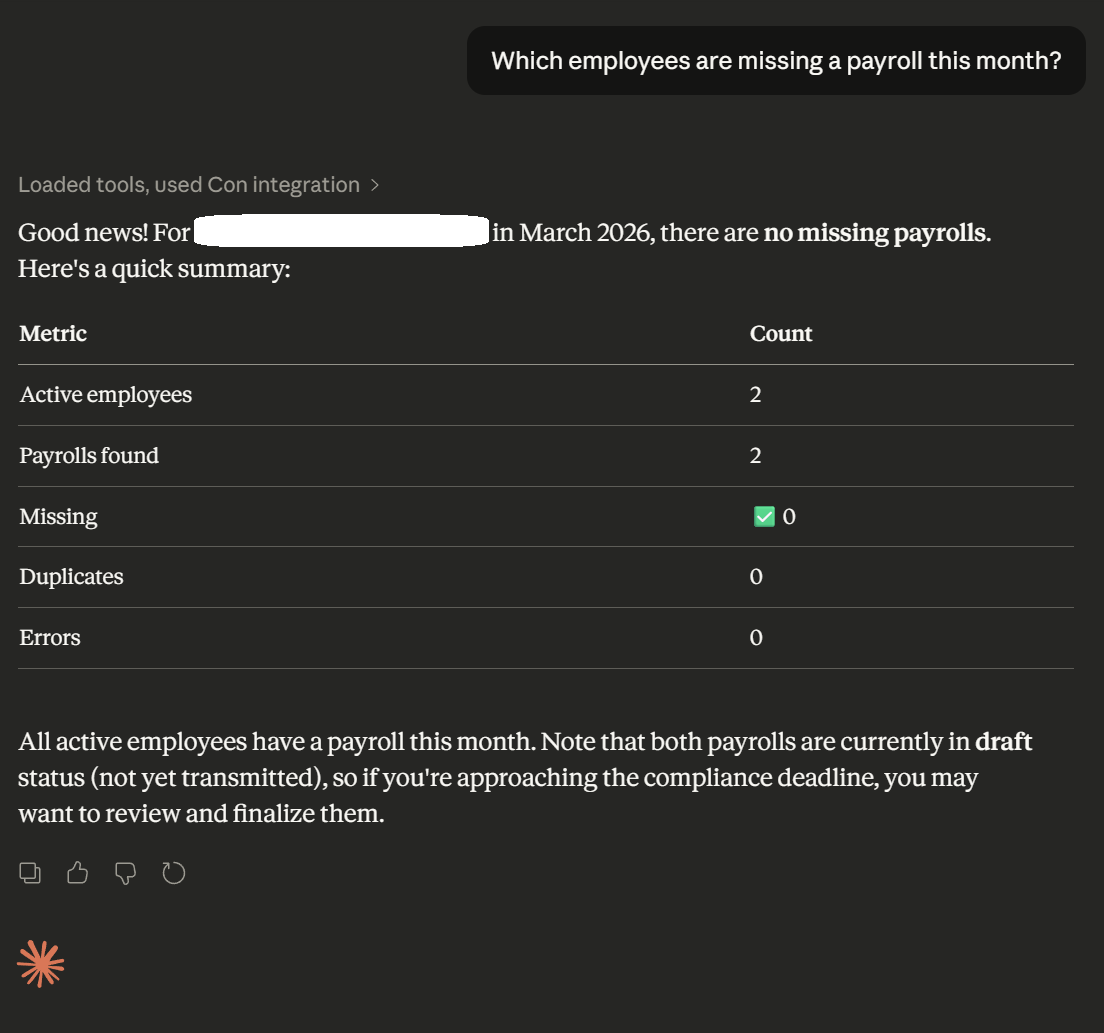
A compliance check — identifying payroll gaps for the current month — answered in a single natural-language question against live production data.
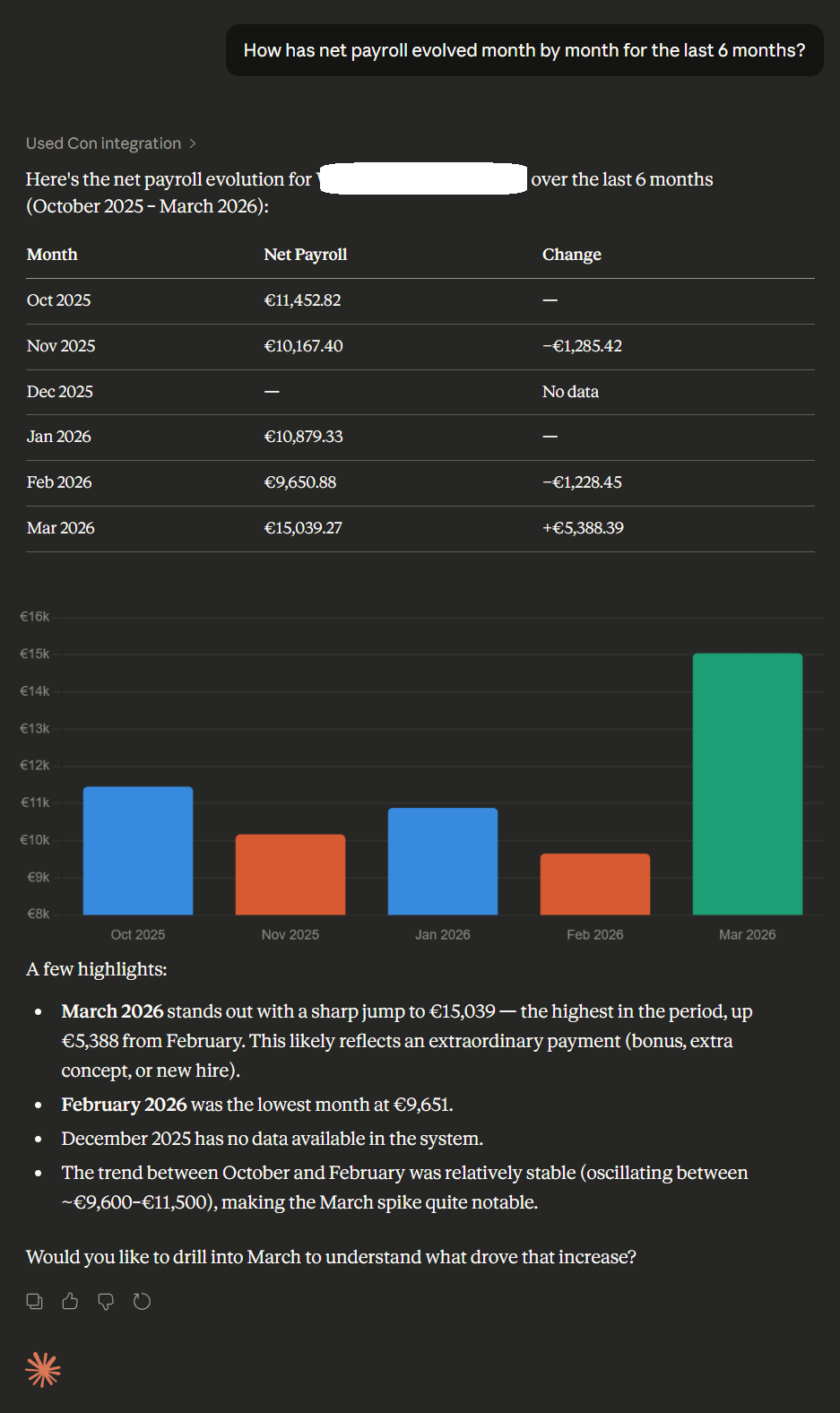
Employer cost trend analysis over the last 6 months, pulled from live data and returned in conversation — without a dashboard or BI export.
Why This Is Different From Just Using an API
If you already have APIs, this is the natural question. APIs are well understood, well deployed, and your teams know how to build them. Why add another layer?
The difference is in who — or what — is calling them. APIs were designed for code that knows exactly what to call and when. MCP is designed for AI models that need to figure that out themselves. A few specific differences that matter in practice:
-
✓
Any MCP-capable host can connect — portability is the point.
ChatGPT, Claude, VS Code Copilot and others support MCP natively. Each host has its own UX, security gates, and entitlement model — that’s real, and your MCP server needs to account for it. The server is built once; the clients are yours to choose.
-
✓
Stateful sessions and structured auth.
MCP supports stateful sessions (Streamable HTTP transports can assign a session ID that clients carry on subsequent requests) and defines an OAuth-based authorisation flow for HTTP deployments. The host still controls what context is shared and when tools are invoked — MCP provides the structured surface; your server governs the boundaries.
-
✓
Tool discovery is dynamic.
The AI learns what tools are available at runtime via capability negotiation during initialisation. New capabilities become available to every connected client without code changes on the client side.
-
✓
The model decides when to use a tool.
You describe what each capability does. The model reasons about when to call it, in what order, with what parameters. This is qualitatively different from an API call sequence you’ve hardcoded in advance — it adapts to the question being asked.
An API gives a machine a door. MCP gives an AI a map of the building, the keys, and the judgment to navigate it.
Dashboards Were Just the Beginning
For three decades, companies consumed their operational data through reports and dashboards. Those tools were designed for humans who navigate UIs, run queries on a schedule, and share static exports. They answer "what happened." They don't answer "why" or "what should I do about it."
Conversational interfaces answer all three. And they're accessible to everyone in the company — not just the analyst who knows how to build a report or the engineer who can write the query. When the data lives behind an MCP server, the question becomes the interface.
This is not a prediction about the distant future. Block has documented rolling out company-wide MCP integrations in weeks. MCP's governance has since moved to the Linux Foundation's Agentic AI Foundation — with broad industry backing including Bloomberg — signalling this is infrastructure, not a trend. Gartner forecasts that 40% of enterprise applications will be integrated with task-specific AI agents by end of 2026 — up from under 5% today — with AI systems acting on behalf of users, not just responding to them. The question isn't whether this shift happens. It's whether your systems are ready for it when it does.
An MCP server is how you make your systems AI-ready. Once it exists, every new AI client — current or future — connects to it out of the box. You're not building for one integration. You're building the infrastructure that every integration will use.
What It Actually Takes to Build This in Production
A working MCP demo is not a production MCP integration. The gap between them is where most of the engineering happens. A few things we ran into that anyone building this seriously will face: data minimisation and pseudonymisation must be designed in from the start — resolve sensitive identifiers server-side, under RBAC and audit, before any data reaches the AI context. MCP defines two transport modes — stdio for local servers and Streamable HTTP for remote deployments. In practice, API gateways that don't support streaming well become the main deployment bottleneck — we hit this with a specific deployment target and had to design around it. And AI models don't always use the context you give them exactly as you expect — production resilience means handling model behaviour that deviates from the happy path.
The MCP spec is unusually direct about what is at stake: it explicitly calls out that MCP can enable arbitrary data access and code execution paths, and places the responsibility for consent, tool safety, privacy, and audit squarely on the implementor. We treat this as infrastructure design, not an afterthought. Every tool we expose goes through a risk classification against these four dimensions before it reaches production.
A concrete example of the client fragmentation problem: delivering a PDF document through MCP. A local file URI approach works cleanly in developer tooling like VS Code. It breaks entirely in Claude.ai web and ChatGPT, which run in sandboxed browser contexts that can't access the local filesystem. Solving this required a different delivery mechanism that works across all clients — not just the first one you test against. MCP client fragmentation is real, and it requires deliberate design decisions rather than assuming the first working approach is the portable one.
The integration we shipped covers a full OAuth stack, a multi-tenant permission model, and over 230 tests. It runs across VS Code Copilot, Claude Desktop, Claude.ai web, and ChatGPT. We know what the hard parts are because we've built through them.
WantedForCode Can Build This for Your System
We've built a production MCP integration for a multi-tenant payroll and HR platform. We know the architecture, the security decisions, the deployment constraints, and how to make the same server work reliably across different AI clients. That knowledge transfers directly to other systems.
If your platform has data that your team, your customers, or your AI agents should be able to access through conversation — we can build the integration. This isn't a capability we're proposing in theory. It's something we've shipped. If you're evaluating whether to invest in MCP for your system, start with what your data looks like and what queries your users actually need answered. That's where we start too.
The Infrastructure You'll Want to Have Built Already
The companies moving fastest with AI right now are the ones whose systems were already instrumented when the need arrived. An MCP server is infrastructure in that sense — it doesn't do anything visible on its own, but it's what makes every AI client that comes after it work without additional integration effort.
The companies that don't have it will be building N×M integrations for years — one per model, one per system, as the AI landscape keeps fragmenting. The companies that do have it will connect new clients in days. That's the compounding advantage of building the right abstraction once, rather than building connectors indefinitely.
In two weeks:
-
✓
Week 1
Map your top use cases onto an MCP tool surface. Define scopes, tenancy model, and auth boundaries. Identify the risk classes for each tool (data access, code execution, privacy exposure).
-
✓
Week 2
Working prototype server. Rollout plan across ChatGPT, Claude, and Copilot. Risk register and audit plan. No slideware — an actual implementation roadmap.
Related Posts
Got a Project in Mind?
